1z0-100 Practice Exam - Oracle Linux 5 and 6 System Administration
Reliable Study Materials & Testing Engine for 1z0-100 Exam Success!
Exam Code: 1z0-100
Exam Name: Oracle Linux 5 and 6 System Administration
Certification Provider: Oracle
Corresponding Certifications: Oracle Certified Associate, Oracle Linux 5 and 6 System Administrator , Oracle Linux Administration


Free Updates PDF & Test Engine
Verified By IT Certified Experts
Guaranteed To Have Actual Exam Questions
Up-To-Date Exam Study Material
99.5% High Success Pass Rate
100% Accurate Answers
100% Money Back Guarantee
Instant Downloads
Free Fast Exam Updates
Exam Questions And Answers PDF
Best Value Available in Market
Try Demo Before You Buy
Secure Shopping Experience
1z0-100: Oracle Linux 5 and 6 System Administration Study Material and Test Engine
Last Update Check: Mar 18, 2026
Latest 141 Questions & Answers
45-75% OFF
Hurry up! offer ends in 00 Days 00h 00m 00s
*Download the Test Player for FREE
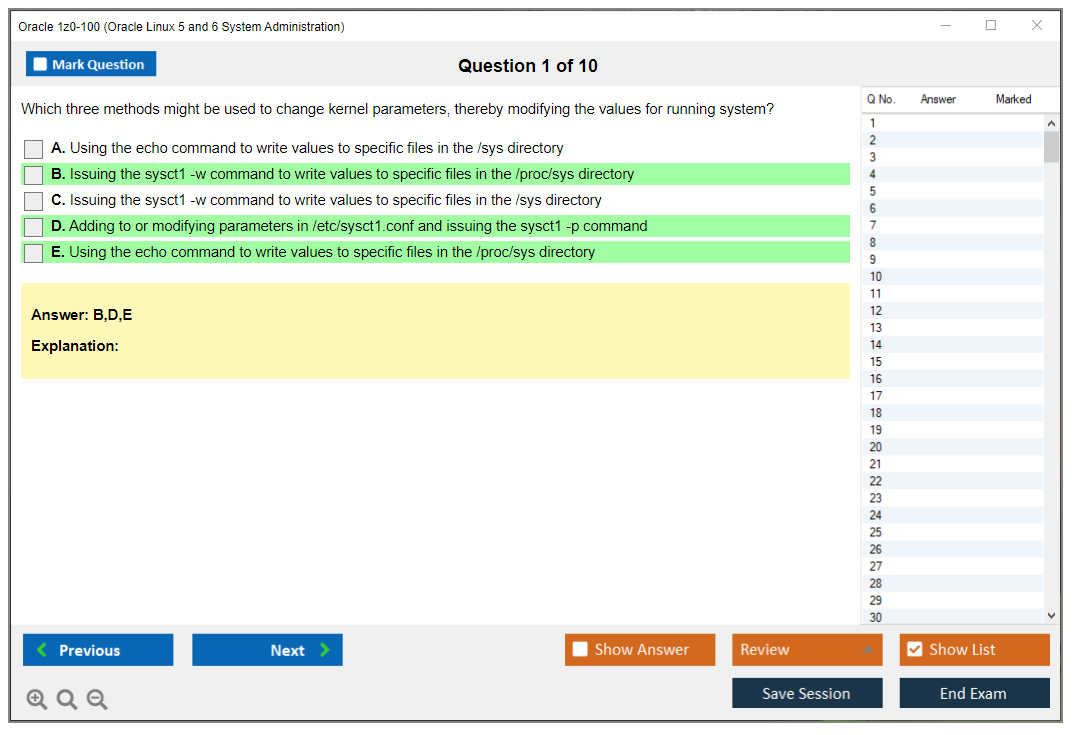
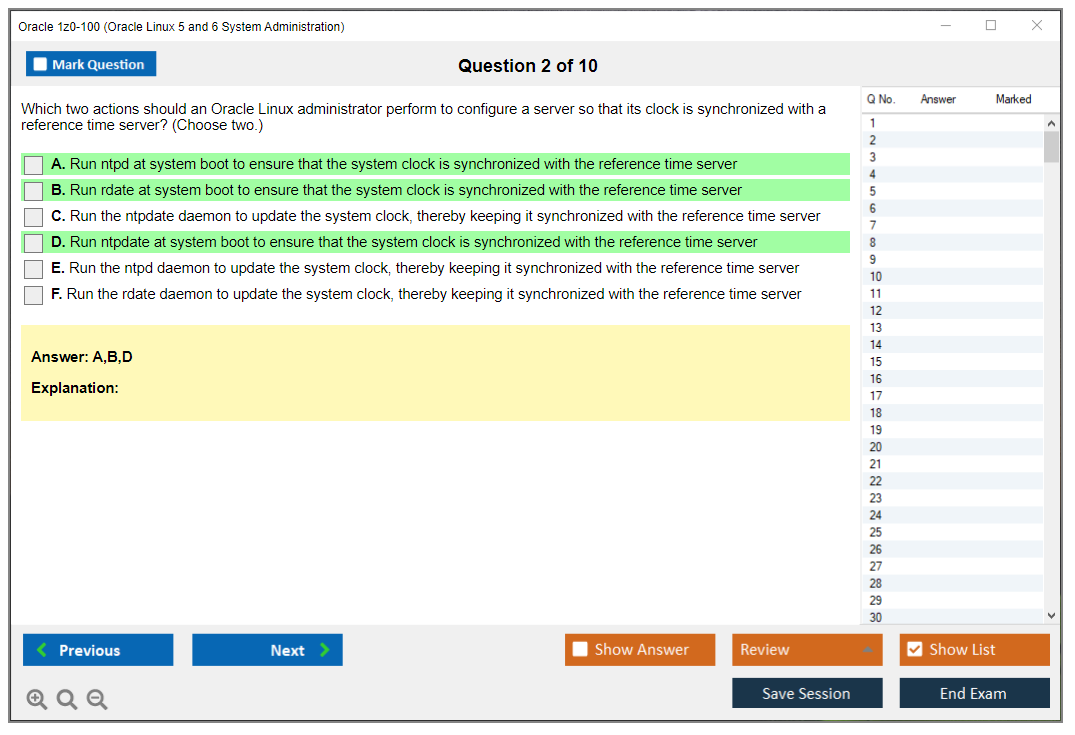
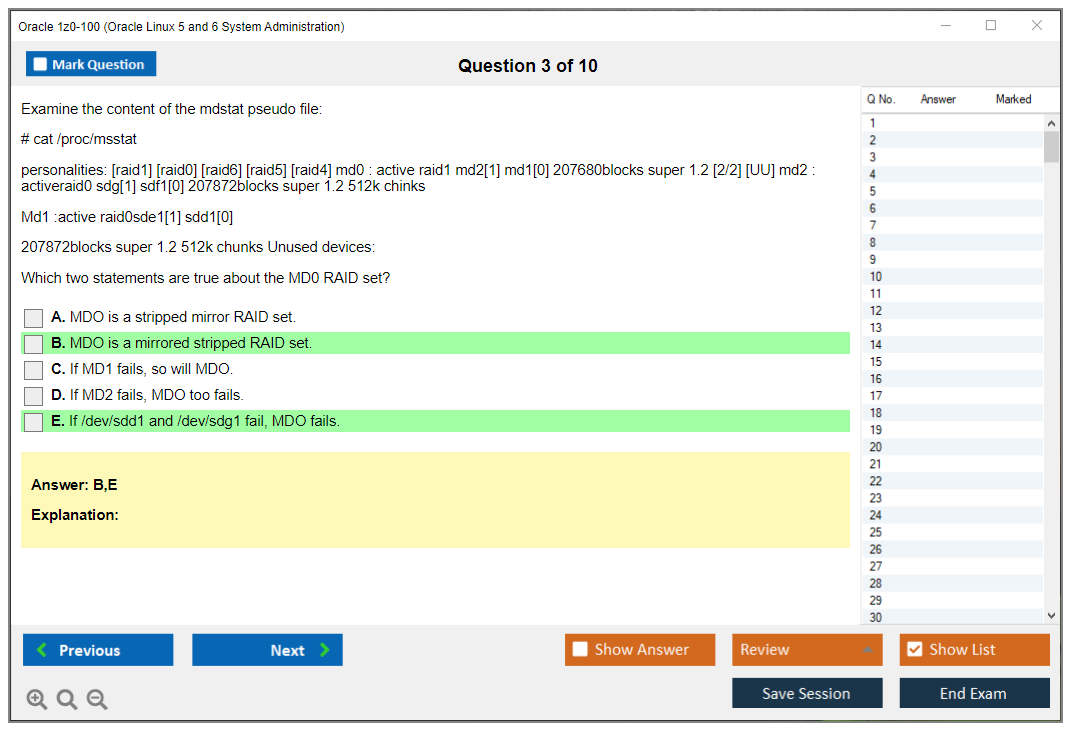
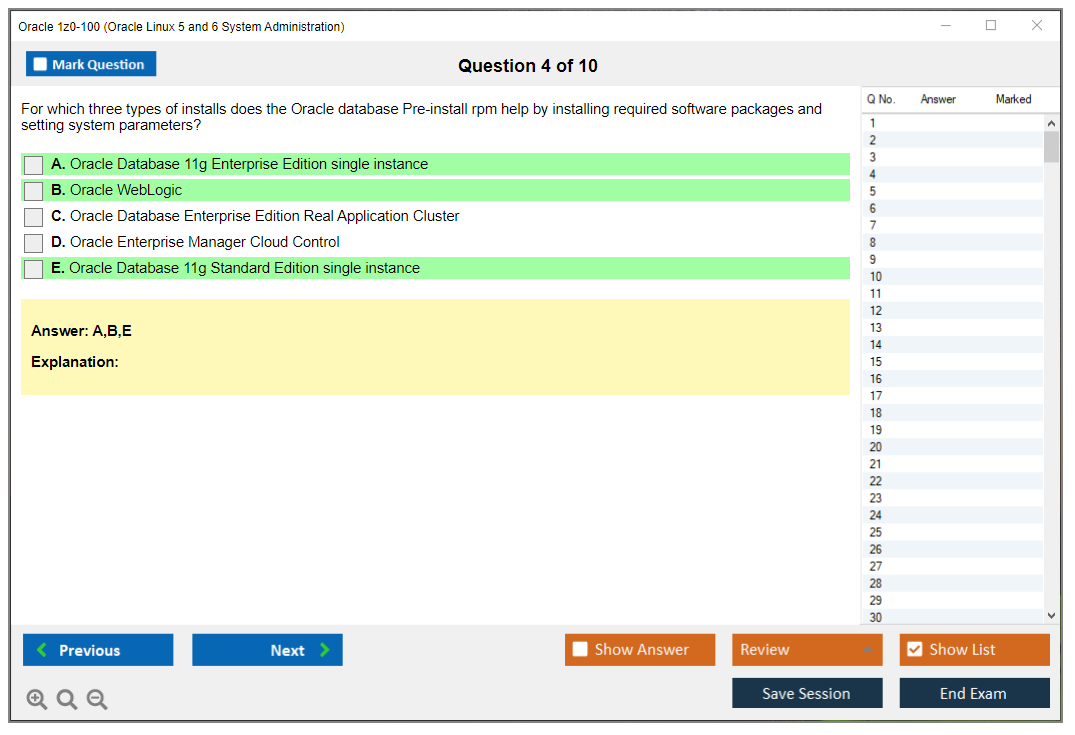
Dumpsarena Oracle Oracle Linux 5 and 6 System Administration (1z0-100) Free Practice Exam Simulator Test Engine Exam preparation with its cutting-edge combination of authentic test simulation, dynamic adaptability, and intuitive design. Recognized as the industry-leading practice platform, it empowers candidates to master their certification journey through these standout features.
What is in the Premium File?
Satisfaction Policy – Dumpsarena.co
At DumpsArena.co, your success is our top priority. Our dedicated technical team works tirelessly day and night to deliver high-quality, up-to-date Practice Exam and study resources. We carefully craft our content to ensure it’s accurate, relevant, and aligned with the latest exam guidelines. Your satisfaction matters to us, and we are always working to provide you with the best possible learning experience. If you’re ever unsatisfied with our material, don’t hesitate to reach out—we’re here to support you. With DumpsArena.co, you can study with confidence, backed by a team you can trust.
Oracle 1z0-100 Exam FAQs
Introduction of Oracle 1z0-100 Exam!
The Oracle 1z0-100 is an Oracle Linux 5 and 6 System Administration exam. It is designed to test the knowledge and skills of an individual in the areas of system administration, installation, configuration, and troubleshooting of Oracle Linux 5 and 6. The exam covers topics such as system architecture, installation, configuration, and troubleshooting of Oracle Linux 5 and 6, as well as the use of command line tools and scripting.
What is the Duration of Oracle 1z0-100 Exam?
The Oracle 1z0-100 exam is a 90-minute exam consisting of 60 multiple-choice questions.
What are the Number of Questions Asked in Oracle 1z0-100 Exam?
There are a total of 60 questions on the Oracle 1z0-100 exam.
What is the Passing Score for Oracle 1z0-100 Exam?
The passing score for the Oracle 1z0-100 exam is 65%.
What is the Competency Level required for Oracle 1z0-100 Exam?
The Oracle 1z0-100 exam is an entry-level exam for Oracle Database 11g. It is designed to test the knowledge and skills of candidates in the areas of database architecture, installation, configuration, and troubleshooting. The exam is intended for individuals who have a basic understanding of database concepts and who are familiar with the Oracle Database 11g product. The recommended competency level for this exam is Associate.
What is the Question Format of Oracle 1z0-100 Exam?
The Oracle 1z0-100 exam has a multiple choice format with 75 questions. Each question has four possible answers and the test taker must choose the correct answer to receive credit for the question.
How Can You Take Oracle 1z0-100 Exam?
Oracle 1z0-100 exam can be taken either online or in a testing center. The online version of the exam is administered by Pearson VUE and the testing center version is administered by Oracle University. The exam covers topics such as Oracle Database Administration, Cloud Administration, Security, and Network Administration.
What Language Oracle 1z0-100 Exam is Offered?
The Oracle 1z0-100 exam is offered in English.
What is the Cost of Oracle 1z0-100 Exam?
The cost of the Oracle 1Z0-100 exam is $245 USD.
What is the Target Audience of Oracle 1z0-100 Exam?
The Oracle 1z0-100 exam is designed for individuals who want to become Oracle Database 11g: SQL Fundamentals certified. This certification is intended for individuals who have a basic understanding of database concepts and an understanding of the basic SQL syntax. The exam is also suitable for individuals with a basic knowledge of Oracle Database 11g.
What is the Average Salary of Oracle 1z0-100 Certified in the Market?
The exact salary you can expect to earn after obtaining Oracle 1z0-100 certification will depend on the specific job you apply for and the location of the job. However, according to PayScale, the average salary for Oracle Certified Professionals is $82,000.
Who are the Testing Providers of Oracle 1z0-100 Exam?
Oracle provides official practice tests and training courses for the 1z0-100 exam. You can find more information and purchase these resources through the Oracle website. Additionally, some third-party websites offer practice tests and study materials to help prepare for the 1z0-100 exam.
What is the Recommended Experience for Oracle 1z0-100 Exam?
The Oracle 1z0-100 exam is intended to assess the knowledge and skills of candidates in the fundamentals of the Oracle Autonomous Database. Candidates should possess a basic understanding of the architecture and features of Oracle Autonomous Database, an understanding of how to use the Oracle Autonomous Database Cloud Service console, and the ability to perform basic administrative tasks. Additionally, candidates should have a working knowledge of SQL and PL/SQL.
What are the Prerequisites of Oracle 1z0-100 Exam?
The Oracle 1z0-100 exam is an entry-level certification designed to assess an individual's knowledge of Oracle Cloud Infrastructure. The exam covers topics such as architecture, security, networking, storage, compute, and database services. Candidates should have a basic understanding of cloud computing, operating systems, and networking before taking this exam.
What is the Expected Retirement Date of Oracle 1z0-100 Exam?
The official website to check the expected retirement date of Oracle 1z0-100 exam is: https://education.oracle.com/pls/web_prod-plq-dad/db_pages.getpage?page_id=5001&get_params=p_exam_id:1Z0-100.
What is the Difficulty Level of Oracle 1z0-100 Exam?
The Oracle 1z0-100 exam is considered to be of moderate difficulty. It is not overly difficult, but it does require a good understanding of the material and some practice to pass.
What is the Roadmap / Track of Oracle 1z0-100 Exam?
The Oracle 1z0-100 Exam is a certification exam that tests an individual's knowledge of using Oracle Cloud Infrastructure (OCI) services to build and manage cloud infrastructure. The exam is divided into two parts, with each part consisting of multiple-choice questions. The topics covered in the exam include cloud computing concepts, OCI architecture and services, OCI management, and OCI security. The exam is part of the Oracle Cloud Infrastructure Certification Track and Roadmap, which provides a comprehensive curriculum of courses and exams for professionals interested in gaining expertise in the Oracle Cloud Infrastructure platform.
What are the Topics Oracle 1z0-100 Exam Covers?
The Oracle 1z0-100 exam covers the following topics:
1. Oracle Cloud Infrastructure: This section covers the core concepts and components of Oracle Cloud Infrastructure. It includes the architecture, networking, storage, compute, and other services.
2. Oracle Cloud Infrastructure Compute: This section covers the fundamentals of Oracle Cloud Infrastructure Compute, including instance types, images, and the compute service.
3. Oracle Cloud Infrastructure Networking: This section covers the fundamentals of Oracle Cloud Infrastructure Networking, including network components, network services, and security.
4. Oracle Cloud Infrastructure Storage: This section covers the fundamentals of Oracle Cloud Infrastructure Storage, including block storage, object storage, and file storage.
5. Oracle Cloud Infrastructure Security: This section covers the fundamentals of Oracle Cloud Infrastructure Security, including authentication, authorization, and encryption.
6. Oracle Cloud Infrastructure Management: This section covers the fundamentals of Oracle Cloud Infrastructure Management, including the Oracle Cloud Infrastructure
What are the Sample Questions of Oracle 1z0-100 Exam?
1. What is the purpose of the Oracle Universal Installer (OUI)?
2. What are the different types of database objects available in Oracle?
3. How can you create a database in Oracle?
4. What is the purpose of the Data Dictionary in Oracle?
5. What are the different types of privileges that can be granted in Oracle?
6. What is the difference between a clustered and a non-clustered index in Oracle?
7. How can you view the execution plan of a query in Oracle?
8. What is the purpose of the Oracle Recovery Manager (RMAN)?
9. How can you create a stored procedure in Oracle?
10. What is the difference between the Oracle SQL and PL/SQL languages?
Oracle 1z0-100 Exam Overview (Oracle Linux 5 and 6 System Administration) Why Oracle Linux 5 and 6 still matter in 2024 and beyond Okay, real talk here. Oracle Linux 5 and 6? I get it. These releases seem prehistoric, right? Why would anyone seriously pursue certification covering operating systems that're technically end-of-life or circling the drain? But here's where reality diverges from theory: enterprise environments operate at the speed of continental drift. I've personally stepped into data centers where mission-critical Oracle databases continue chugging away on Linux 6 installations, completely untouched because, well, the thing is, "if it ain't broke, don't fix it" might as well be the eleventh commandment in organizations terrified of operational risk. The Oracle 1z0-100 exam validates your capabilities around installing, configuring, and managing Oracle Linux 5 and 6 systems comprehensively. It's nested within the Oracle Certified Professional Oracle Linux Administrator... Read More
Oracle 1z0-100 Exam Overview (Oracle Linux 5 and 6 System Administration)
Why Oracle Linux 5 and 6 still matter in 2024 and beyond
Okay, real talk here. Oracle Linux 5 and 6? I get it. These releases seem prehistoric, right? Why would anyone seriously pursue certification covering operating systems that're technically end-of-life or circling the drain? But here's where reality diverges from theory: enterprise environments operate at the speed of continental drift. I've personally stepped into data centers where mission-critical Oracle databases continue chugging away on Linux 6 installations, completely untouched because, well, the thing is, "if it ain't broke, don't fix it" might as well be the eleventh commandment in organizations terrified of operational risk.
The Oracle 1z0-100 exam validates your capabilities around installing, configuring, and managing Oracle Linux 5 and 6 systems comprehensively. It's nested within the Oracle Certified Professional Oracle Linux Administrator track. This certification basically is foundational base for anyone operating in environments where Oracle products utterly dominate infrastructure stacks. Database administrators needing OS layer comprehension, system administrators propping up Oracle middleware, cloud engineers migrating crusty legacy workloads? They all extract tangible value from this credential. Not gonna lie, the certification simultaneously demonstrates you've grasped Linux fundamentals at profoundly deeper levels than folks who've exclusively touched modern point-and-click interfaces.
Dual-version coverage? Actually strategic. Oracle Linux 5 traced its lineage to RHEL 5 and employed traditional SysV init systems, whereas Oracle Linux 6 pivoted toward Upstart and rolled out substantial changes across package management, kernel features, plus overall system architecture. Mastering both versions means you're equipped to troubleshoot systems spanning that awkward transition period, which absolutely matters when you're inheriting infrastructure that nobody bothered documenting properly (or at all). I once spent three days hunting down a phantom cron job because the previous admin had configured it in a nonstandard location on a Linux 5 box. Good times.
What you're actually proving with this credential
Real-world skills matter. The 1z0-100 certification validates practical competencies system administrators deploy daily. We're discussing user and group management: account creation, permission configuration, PAM setup comprehension. Package management using RPM and YUM, covering repository configuration alongside dependency resolution challenges. Storage administration dives headfirst into LVM (Logical Volume Management), filesystem creation procedures, partition management strategies, and swap configuration details. Network configuration spans interface setup, routing fundamentals, plus troubleshooting connectivity headaches.
Security essentials? They include firewall rules (iptables dominated these versions), foundational SELinux concepts, and implementing coherent security policies across environments. Oracle-specific features tested prominently feature the Unbreakable Enterprise Kernel (UEK), which Oracle engineered specifically to deliver enhanced performance for database workloads. Ksplice zero-downtime patching concepts appear too. This represented Oracle's huge technology for applying kernel patches without rebooting servers, which felt really revolutionary when initially launched.
System monitoring procedures, performance tuning foundations, backup and recovery workflows, troubleshooting stubborn boot issues, managing services across different runlevels. I mean, these constitute the bread-and-butter tasks separating someone who merely Googles commands frantically from someone really understanding what's happening beneath the surface. The exam simultaneously tests theoretical knowledge and hands-on command-line proficiency. You absolutely need command familiarity, but equally when to deploy them and how interpreting their output actually works.
Who's taking this exam and why it matters for career progression
Most candidates arrive with 6-12 months of genuine hands-on Linux administration experience already logged. You should feel comfortable working through command-line interfaces, grasp basic networking concepts solidly, and possess meaningful exposure to enterprise IT environments. System administrators eyeing specialization in Oracle environments pursue this. DevOps engineers propping up Oracle database deployments require this knowledge foundation. Database administrators wanting deeper OS layer understanding (especially key when troubleshooting gnarly performance issues spanning database and system layers simultaneously) discover significant value here.
Cloud infrastructure professionals shepherding Oracle workloads toward Oracle Cloud Infrastructure benefit tremendously because OCI still runs Oracle Linux underneath everything. Technical support specialists supporting diverse Oracle products require this foundational comprehension. Infrastructure engineers wrangling mixed Linux environments where Oracle products are strategically deployed have consistently found this certification unlocks previously closed doors.
Career applications stretch broader than initial expectations suggest. Linux system administrator roles within Oracle-centric shops obviously prize it. Oracle database administrator positions increasingly demand OS-level competency. You really can't just master SQL and consider yourself complete anymore. Cloud operations engineer roles, particularly those concentrated on Oracle Cloud migrations, actively seek this background. Technical support specialist positions at Oracle partners or Oracle itself weigh this certification favorably during candidate evaluation.
How this certification fits into Oracle's broader credential ecosystem
Foundation matters here. The 1z0-100 is base for Oracle's Linux administration track comprehensively. It's frequently prerequisite knowledge for advanced Oracle database certifications, particularly the Oracle Database Administration I and Oracle Database Administration II credentials, because those explicitly assume solid understanding of underlying operating system mechanics. Planning to pursue Oracle Exadata certifications like the Oracle Exadata Database Machine and Cloud Service Implementation? This Linux foundation becomes absolutely critical.
The certification simultaneously complements other Oracle infrastructure credentials effectively. Working with Oracle WebLogic Server or Oracle SOA Suite? Understanding the Linux layer where these middleware products actually run makes you dramatically more effective at troubleshooting complex issues. Even developers chasing Java certifications benefit from comprehending deployment environments realistically.
For organizations running Oracle E-Business Suite modules like General Ledger or Purchasing, the application tier executes on Linux infrastructure, and maintaining administrators who really understand both layers substantially reduces the finger-pointing circus when inevitable issues materialize.
Understanding what makes this different from other Linux certifications
Red Hat's RHCSA? CompTIA Linux+? Compared to those, the 1z0-100 operates narrower in version scope but penetrates deeper into Oracle-specific integration territory. RHCSA covers newer RHEL versions featuring broader administrative scenarios. Linux+ pursues vendor-neutral coverage spanning multiple distributions. The Oracle 1z0-100 exam concentrates specifically on Oracle Linux 5 and 6, but simultaneously tests Oracle-specific features like UEK, Ksplice, and integration with Oracle support systems plus public YUM repositories.
Value proposition clarity. You're validating both generic Linux administration competencies and Oracle ecosystem integration knowledge simultaneously. For organizations heavily invested in Oracle technologies, that particular combination delivers substantially more value than purely vendor-neutral certification alternatives. The credential signals you understand not merely Linux generically, but Linux exactly as Oracle deploys and supports it operationally.
The legacy factor and transferable skills
Sure, Oracle Linux 5 reached end-of-life officially. Oracle Linux 6 languishes in extended support purgatory. But here's what really matters: fundamental concepts remain remarkably stable. Filesystem hierarchy standards, package management principles, user administration logic, storage concepts, networking fundamentals. These persist consistently across Linux distributions and version iterations. Managing LVM on Oracle Linux 6? You'll manage it competently on Oracle Linux 8. Commands might showcase new options, but underlying concepts stay essentially identical.
Countless enterprise environments continue maintaining these systems because migration risk dramatically outweighs perceived upgrade benefits. I've personally encountered Oracle E-Business Suite installations on Linux 6 that're utterly business-critical and won't get touched until circumstances absolutely force action. Maintaining administrators capable of maintaining, troubleshooting, and securing these systems remains tangibly valuable. The certification also demonstrates you're comfortable working with legacy systems, which represents an underrated skill in enterprise IT where technical debt is practically omnipresent.
Examining advanced Oracle Linux certifications, the logical progression from this foundation makes complete sense. Understanding older versions helps you really appreciate improvements in newer releases and makes upgrade planning considerably more informed.
Oracle 1z0-100 Exam Cost and Registration
What the certification validates
The Oracle 1z0-100 exam proves you can actually manage Oracle Linux 5 and 6 systems like someone who's done the work, not just memorized syntax. We're talking real admin work here: the stuff that keeps servers running and users (mostly) happy.
Old-school Linux, yeah. Still matters though. Resumes love it.
You're demonstrating competence with Linux user and group management Oracle Linux, service configs, log hunting, storage setups, and that classic "server won't boot and everyone's panicking" troubleshooting scenario. Plus you'll encounter Oracle Linux features like UEK and Ksplice patching Oracle Linux where they're actually relevant to these versions.
Who should take this exam (admin roles and use cases)
Anyone touching legacy Oracle Linux boxes should consider this. Look, tons of organizations still run OL6 because their application vendor basically said "upgrade and you're on your own," so everyone just deals with it. This fits junior sysadmins hunting for vendor credentials. DBAs who suddenly became "the Linux person" whether they wanted to or not. Infrastructure teams supporting Oracle environments where having "Oracle Certified Professional Oracle Linux Administrator" on your profile actually opens doors internally.
Not universal, honestly. Focused on OL9 exclusively? Newer exams make sense.
Exam cost (price range and what affects it)
The 1z0-100 exam cost generally falls between $245 to $295 USD. That's the typical range you'll encounter, though it fluctuates depending on your location, currency conversions, and whatever local taxes get tacked on during checkout.
Regional pricing differences are absolutely real. Oracle adjusts costs by country based on purchasing power parity and market expectations, then local VAT or comparable taxes land on top. Which means two candidates registering for identical exams might see surprisingly different final amounts. Nobody's getting cheated, it's just how Oracle's regional pricing policies function globally.
Plan your budget. Don't estimate blindly. Verify first.
Where to register (Oracle/authorized testing provider)
Honestly, the smart move is checking official sources right before purchasing, since pricing structures and currencies shift regularly. Start here:
- Oracle University website: typically your initial destination for certification information and policy references, though not always where you'll see the final transaction.
- Pearson VUE testing portal: where you'll actually browse available appointment slots and see the precise cost in your local currency after logging in. I mean, it's really the most accurate preview of what you're about to spend.
- Authorized Oracle training partners: mainly useful if you're acquiring vouchers through employer programs or seeking corporate and volume pricing arrangements.
Pearson VUE handles delivery logistics. Oracle partners with Pearson VUE for exam administration, so you'll register through Oracle's certification pathway, but scheduling happens through Pearson VUE's platform. Kind of a two-system shuffle that's mildly irritating but completely standard for Oracle certifications.
Retake policy and fees (what to check before booking)
Fail once? You're paying again. Full amount. Zero automatic discount. There's typically no mandatory waiting period between attempts, which sounds convenient until you realize how quickly money disappears when you're repeating identical mistakes without addressing root knowledge gaps.
Voucher terms matter too. Promotional offers sometimes limit retakes. Fine print saves money.
1z0-100 passing score and exam format
Passing score (how Oracle reports it and where to confirm)
The 1z0-100 passing score question comes up constantly, and here's the frustrating reality: Oracle can modify scoring methodologies or reporting formats for particular exams over time. Your safest bet? Confirm the current passing score directly from the Oracle Certification or exam listing documentation and cross-reference what Pearson VUE displays for your exact exam code and version.
Random forum posts? Sketchy. Including my opinions here. Always verify independently.
Number of questions, duration, and question types
Oracle Linux administration exams like this one typically feature multiple-choice and scenario-based questions. Expect a time-limited format with sufficient question volume that managing your pace becomes critical, and you'll need comfort reading command output and configuration snippets rapidly under pressure. Exact question counts and time allocations can change, so check the current exam page when you're actually scheduling. Again.
Scoring, results, and exam-day rules
You'll typically receive a score report immediately after completing the exam, including section-level performance feedback that suggests which areas need work. Exam-day protocols are rigid: identification must match registration exactly, no reference materials permitted, phones stay outside. For online proctoring you're converting your space into a temporary surveillance-compliant environment.
My first proctored exam I had to remove three coffee mugs and a stack of unrelated books from my desk. The proctor waited while I scrambled around like I was hiding contraband. Felt ridiculous but whatever, those are the rules.
Oracle 1z0-100 difficulty: how hard is it?
Difficulty factors (Linux fundamentals vs Oracle-specific tooling)
How challenging is it really? For experienced admins, it's reasonable. For pure theory learners, it's brutal. The complexity comes from blending standard Linux fundamentals with Oracle-specific elements like UEK behavior patterns and Ksplice patching Oracle Linux mechanics. The exam demands you understand what's typical in Oracle Linux 5/6 environments, not what you'd execute on contemporary systemd-based distributions.
Completely different generation. Different configuration approaches. Different headaches entirely.
Common challenge areas (troubleshooting, services, storage, security)
Predictable struggle zones include boot troubleshooting sequences, service management using OL5/6 methodologies, permissions combined with PAM fundamentals, and storage. Especially LVM and storage administration Oracle Linux when candidates only absorbed it theoretically. Package management catches people off-guard too if they can't logically deduce RPM and YUM package management Oracle Linux solutions from symptom descriptions alone.
Who typically passes on the first attempt
Administrators who've really operated OL5/6 systems, even just VM lab environments, usually pass initially. People transitioning from Ubuntu-exclusive or cloud-native backgrounds frequently underestimate the challenge because they assume Linux skills universalize perfectly. That assumption really costs people.
1z0-100 exam objectives (skills measured)
Installation, boot process, and runlevels/system services
You need solid comfort with installation concepts, boot loader mechanics, runlevel management, and diagnosing why systems fail to start properly.
Users, groups, permissions, and PAM basics
This represents everyday operations. Account creation, group management, sudo-style access patterns, permission structures, and fundamental PAM comprehension.
Package management (RPM/YUM) and repositories
Demonstrate competence with installations, updates, queries, dependency resolution, and repository configuration at practical working levels.
Networking configuration and troubleshooting basics
IP configuration fundamentals. Hostname/DNS basics. Standard diagnostic tools and quick troubleshooting logic chains.
Storage administration (partitions, filesystems, LVM, swap)
Partition management, filesystem operations, mount configurations, swap administration, and LVM tasks reflecting actual production scenarios.
Process management, logging, and job scheduling (cron/at)
Process control. Signal handling. Log file locations and scheduling automated tasks without constant manual supervision.
Security hardening basics (firewall/SELinux concepts as applicable)
Expect fundamental firewall concepts and SELinux awareness as they apply to these particular versions.
Oracle Linux features (UEK, Ksplice, where applicable)
High-level UEK distinctions, and understanding what Ksplice actually accomplishes, beyond merely acknowledging its existence.
Prerequisites for Oracle 1z0-100
Recommended Linux knowledge and hands-on experience
The 1z0-100 prerequisites aren't typically formalized, but functionally you need hands-on practice. Not passive reading. Active doing. Create user accounts. Intentionally break networking configurations. Repair them. Reconstruct LVM setups, recover from corrupted fstab entries.
Suggested prior certs or equivalent skills (not mandatory vs recommended)
No prerequisite certification exists formally, but Linux+ or RHCSA-level practical experience reduces stress levels. Oracle Linux 5 6 admin training can substitute effectively if it emphasizes substantial lab work.
Lab setup prerequisites (VMs, Oracle Linux 5/6 images, networking)
Building a practice lab costs almost nothing. Oracle Linux downloads are freely available, and you can operate OL5/6 inside virtual machines if you obtain appropriate installation images and your hypervisor supports them. Two VMs, isolated network, snapshot capability. You're set.
Best study materials for Oracle 1z0-100
Official Oracle training and exam guide options
Official training carries premium pricing but delivers structured learning paths. Typical 1z0-100 study materials like official guides run $50 to $150, while formal instructor-led courses can reach $500 to $2000 depending on delivery format and geographic region.
Documentation to prioritize (Oracle Linux docs, man pages, release notes)
Oracle Linux documentation, OL5/6 release notes, and man pages. Tedious reading, absolutely. Remarkably effective though. If you can articulate what a command accomplishes using only man page examples, you're positioned well.
Hands-on labs (home lab/virtual lab checklist)
Construct a lab environment forcing repetition: users/groups creation, YUM repository configuration, service management, log analysis, networking setup, LVM operations, backup/restore fundamentals. Intentionally break components and practice recovery.
Study plan (2 to 6 week and 8 to 12 week tracks)
Already administering Linux professionally? 2 to 6 weeks works fine with consistent daily lab practice. Relatively new to administration? 8 to 12 weeks becomes more realistic, because developing muscle memory requires substantially more time than simple pattern recognition.
Oracle 1z0-100 practice tests and exam prep strategy
What to look for in a quality practice test (coverage + explanations)
Quality Oracle Linux system administration practice test resources mirror 1z0-100 exam objectives accurately and explain why particular answers are correct, not merely stating "A is correct." Without educational value, it's just memorization trivia.
Topic-by-topic practice (commands, configs, troubleshooting scenarios)
Focus on individual topics daily and execute them hands-on. Users Monday. Storage Tuesday. Boot recovery Wednesday. Keep detailed notes documenting commands you actually executed successfully.
Final week revision and readiness checklist
Final week emphasizes review and timed practice sessions. Revisit weak knowledge areas, repeat lab exercises without reference materials, and ensure you can work efficiently without stress-induced panic.
Oracle 1z0-100 renewal and certification validity
Does Oracle require renewal for this certification?
Oracle policies vary by program and time period. Some certifications don't "expire" like cloud vendor credentials do, but they can become outdated rapidly regardless. Check Oracle's current certification policy documentation for exact requirements tied to this particular credential.
Recertification paths (newer Oracle Linux exams/certs to consider)
If your organization is modernizing infrastructure, consider pursuing newer Oracle Linux exams aligned with OL7/8/9 rather than remaining indefinitely focused on OL6 technologies.
Keeping skills current (Oracle Linux 7/8/9 progression)
Even after passing 1z0-100, continue learning systemd architectures, modern firewall implementations, updated storage tooling, and contemporary security defaults. Employers prioritize what you can effectively manage today.
FAQs (People Also Ask)
What is the Oracle 1z0-100 exam cost?
Typically $245 to $295 USD, with regional variations from taxation, currency exchange rates, and Oracle's country-specific pricing structures.
What is the passing score for Oracle 1z0-100?
Oracle can update scoring methodologies, so confirm the current passing score through the Oracle exam listing and within the Pearson VUE exam details during your booking process.
How difficult is the Oracle Linux 5 and 6 System Administration exam?
Moderate difficulty if you've performed genuine administration work on OL5/6 systems. Substantially harder if you're extrapolating from generic Linux knowledge without practicing the older service management and boot patterns.
What are the objectives covered in 1z0-100?
Core administration competencies: installation/boot processes, users/groups, permissions, package management, networking, storage (including LVM), processes/logs/scheduling, fundamental security, and Oracle Linux specifics like UEK and Ksplice where contextually relevant.
Which study materials and practice tests work best for 1z0-100?
Begin with Oracle documentation and man pages, then supplement with an official guide if you prefer structured learning. Use practice tests that provide detailed explanations, and dedicate majority time to VM lab environments actually executing tasks, because practical experience creates lasting retention.
One financial consideration. If your employer offers certification reimbursement, use that benefit. Also monitor promotions: Oracle periodically runs discounts, event-based vouchers (OpenWorld/CloudWorld attendees), and academic pricing programs. For organizations purchasing multiple exams, corporate and volume pricing through authorized training partners can reduce per-exam costs noticeably. Vouchers typically remain valid 6 to 12 months, so verify expiration dates carefully. Understand cancellation and rescheduling policies: Pearson VUE generally permits schedule changes 24 to 48 hours in advance without penalty, but late modifications usually forfeit the entire fee. Refunds are essentially non-refundable except documented emergencies or verified technical failures during online proctored sessions.
Oracle 1z0-100 Passing Score and Exam Format
Understanding Oracle's scaled scoring system
Oracle doesn't mess around with exam scoring. The 1z0-100 passing score? Hovers between 60-70% correct answers, though Oracle's never been super transparent about the exact cutoff. They use what's called scaled scoring, which basically means your raw score (how many you actually got right) gets converted to a percentage scale from 0 to 100%. The thing is, the passing threshold's predetermined, but not all questions carry identical weight.
Simple multiple-choice questions might be worth less than scenario-based questions that test whether you actually know how to troubleshoot a boot failure or configure LVM properly. Knowing the syntax for useradd versus actually understanding user management, PAM configuration, and permission inheritance? Those aren't equivalent skills.
How you'll find out if you passed
Immediately after clicking that final submit button, you get a preliminary pass/fail notification. No waiting around wondering. That instant feedback's one of the better aspects of Oracle's certification process, especially compared to vendors who make you wait weeks for results.
But detailed breakdowns take longer. Your official score report (the one showing performance in each exam objective domain) appears in your Oracle CertView portal within 30 minutes to 24 hours. That's when you'll see section-level feedback that's actually valuable if you don't pass on the first attempt because it tells you exactly where you fell short. Maybe you crushed package management and networking but bombed on storage administration and SELinux basics.
What you're actually facing on exam day
The exam throws 70-90 questions at you. Oracle reserves the right to adjust that count without telling anyone in advance. You get 120 minutes. Sounds like adequate time until you hit a few gnarly scenario questions that require you to mentally walk through an entire troubleshooting sequence.
Question types? Multiple-choice single answer (pick one), multiple-choice multiple answers (select all that apply, and yes, you need ALL correct choices to get credit), and scenario-based questions. Those scenarios might describe a system that won't boot and ask which command sequence would diagnose the issue. Or present a configuration file snippet and ask what's wrong.
Here's what trips people up: there's no partial credit. You either nail the question or you don't. Close doesn't count. And unlike some Linux certifications that give you actual command-line access to a live system, the 1z0-100 tests command knowledge entirely through multiple-choice format. You won't be typing commands, but you better know exact syntax, proper flags, and which config files live where.
I remember taking a similar Oracle exam years back and spending way too much time second-guessing myself on a systemd question. Turned out my first instinct was right. Trust your preparation.
Difficulty distribution and what Oracle won't tell you
Questions span foundational knowledge (like basic file permissions), intermediate application scenarios (configuring YUM repositories or setting up cron jobs), and advanced troubleshooting situations involving boot failures or diagnosing network configuration issues that require you to think through multiple layers of system architecture simultaneously. Oracle mixes these throughout the exam rather than clustering easy questions at the start.
Before seeing the first question, you'll accept an NDA. This means specific questions you encounter can't be shared publicly, which is why you'll never find exact exam dumps that are both current and legal. The exam's available in English and select other languages depending on your region. Verify during registration if you need a non-English version.
Test center logistics that actually matter
Testing at a Pearson VUE center? Bring government-issued photo ID with signature. The name on that ID must match your registration exactly. Middle initials matter here. You can't bring anything into the testing room. Phone, wallet, notes, your lucky pen. All go in a secure locker outside. The center provides scratch paper or a whiteboard with marker for calculations or diagramming.
There's a basic calculator function in the exam software if you need it for something like calculating partition sizes or inode ratios. Won't need much math. No physical calculators allowed anyway.
Here's something nobody warns you about: there are no scheduled breaks during the two-hour window. You can take a bathroom break if needed, but the exam timer keeps running regardless. Plan accordingly, especially if you're someone who needs multiple breaks during long concentration periods.
Online proctoring requirements if you go that route
Testing from home? Requires a quiet, private room with a clean desk. Your webcam and microphone need to work properly without any glitches. You'll do a system check before the exam starts, then a live proctor monitors you via camera throughout the entire session. They can see your screen, your face, and your surroundings.
Don't have anyone else in the room. Don't talk to yourself (harder than it sounds when you're stuck on a question). Keep your eyes on the screen consistently.
The online option sounds convenient until you realize you need to clear your entire desk, remove any posters or papers from walls within camera view, and create a sterile testing environment in your own home. More hassle than just driving to a testing center for some people.
Navigation and submission process
You can flag questions for review. Work through backward and forward through the exam before final submission. This is huge for time management strategies. Hit a complicated scenario question early on? Flag it, move past it, knock out the easier questions, then circle back with whatever time remains in your allocation.
Final submission requires an explicit action. You have to click through a confirmation screen that verifies you're actually done. Before that final submit, you get a chance to review all flagged questions. I've caught careless mistakes during final review more times than I want to admit.
After submission, there's an optional survey about your exam experience and preparation. Take it or skip it. Doesn't affect your score either way. Then you get that immediate pass/fail result.
What happens to your score long-term
Passing scores remain valid indefinitely for certification purposes. You passed the 1z0-100 in 2015? That certification still counts officially. However, the practical knowledge becomes outdated fast in IT environments. Oracle Linux 5 and 6 are ancient by current standards. Oracle Linux 9 is the current major release now. Your certification proves you passed the exam, but employers care more about current, hands-on experience with modern systems rather than outdated knowledge from deprecated versions.
If you're serious about Oracle Linux administration as a career path, consider this exam a foundation layer for future certifications and career advancement opportunities. After passing 1z0-100, many admins move on to the Oracle Linux 6 Advanced System Administration exam or pivot to Oracle's database administration track starting with Oracle Database Administration I. The scoring methodology and exam format remain similar across Oracle's certification portfolio, so understanding how 1z0-100 scoring works prepares you for future Oracle exams too.
For practice exams mirroring actual question format? The 1z0-100 Practice Exam Questions Pack at $36.99 gives you scenario-based questions with detailed explanations for each answer. Worth it just to get familiar with how Oracle phrases questions and what level of command detail they expect you to know.
What this certification actually proves
The Oracle 1z0-100 exam tests whether you can actually manage an Oracle Linux system when things go sideways, when services refuse to start or you're staring at a full filesystem. It maps to the Oracle Linux 5 and 6 System Administration certification, covering the bread-and-butter admin stuff: boot processes, user management, package handling, storage configuration, networking, and security fundamentals.
Here's the thing. It's not some "Linux trivia" quiz where you memorize obscure facts. It's more like "prove you won't panic when the system breaks" knowledge, with Oracle-specific elements thrown in: UEK (their custom kernel), Oracle's public YUM repositories, and Ksplice patching, which are Oracle Linux concepts you've probably never encountered if your entire background involves generic Ubuntu desktop environments where everything just works through a GUI.
Who should take it (and who shouldn't yet)
Makes sense for junior to mid-level sysadmins. Supporting Oracle workloads? Running Oracle Linux because of support contracts? This exam fits. RHEL/CentOS background? You'll adapt quickly since the foundations overlap significantly. Windows admin who only speaks PowerShell? This'll feel like someone shoved you into a terminal and hid your mouse. Brutal transition, honestly.
Good candidates: folks with 6-12 months of actual Linux admin experience, people aiming for Oracle Certified Professional Oracle Linux Administrator credentials later, anyone needing credibility for Oracle Linux operations roles. Bad timing? Anyone depending entirely on video courses without labs. Zero CLI muscle memory. Theory alone won't rescue you when command syntax matters.
What you'll pay and how to book it
Yeah, people immediately ask about the 1z0-100 exam cost. Pricing varies by country and testing provider. You're typically looking at standard Oracle exam pricing (often hovering around $200-ish USD, sometimes higher depending on your region and applicable taxes). Check current numbers before committing, because Oracle adjusts prices and currency conversions can blindside you.
Registration happens through Oracle's certification portal and their authorized testing providers. Choose your delivery method. Pick a date. Be strict about your timeline because procrastination has an undefeated record.
Retakes. Not gonna sugarcoat it. Oracle retake policies can frustrate you, and they shift occasionally, so confirm the current waiting period and fees before booking your first attempt. If you fail, the score report becomes valuable anyway, showing you exactly where you got destroyed.
Passing score and format, in plain English
People constantly ask about the 1z0-100 passing score. Oracle typically reports passing as either a scaled score or percentage, and the exact threshold can shift between exam versions, so the only honest answer is: verify it in the Oracle exam listing for your specific 1z0-100 exam code and version. Don't trust random forum posts from 2018.
Format? Expect multiple-choice plus scenario questions. You get 120 minutes, which generally works fine, but some prompts are ridiculously wordy and you'll re-read them because one tiny detail completely changes which command option is correct.
Rules follow standard proctored exam protocols. No notes allowed. No "let me just Google that flag real quick." Results typically appear immediately or near-immediately, and you'll receive a breakdown by objective area, which matters enormously if you're planning a retake and need to know where you bled points.
So how hard is it, really?
Intermediate difficulty. If you've got 6-12 months of genuine Linux admin work under your belt, it's manageable. Challenging if you're arriving with mostly theoretical knowledge and a couple "I installed Linux once" memories from college. The Oracle 1z0-100 exam covers substantial ground at medium depth, and that breadth trips people up, because you can't just be the "networking person" or the "storage person" and wing everything else when questions span domains.
Pass rate estimates stay fuzzy since Oracle doesn't publish official numbers, but community chatter usually lands around 60-75% first-attempt pass rate for adequately prepared candidates. Sounds about right to me, actually. People who lab everything extensively tend to pass. People who memorize slides tend to get surprised and fail.
The primary difficulty factors? Three things. First, breadth across multiple domains where you can't have glaring weak spots. Second, Oracle-specific tooling knowledge that generic Linux courses skip entirely. Third, the dual-version complexity of Oracle Linux 5 versus 6, where you need to remember differences like SysV init behavior versus Upstart components, plus config file locations and tooling shifts that matter during troubleshooting scenarios.
I remember once spending three hours on a Saturday trying to figure out why a perfectly good init script worked flawlessly on OL5 but refused to cooperate on OL6. Turned out I'd missed a single dependency declaration that Upstart cared about but SysV ignored. That kind of version-specific gotcha shows up constantly in this exam.
The sections that trip people up
Storage hurts people. LVM and storage administration Oracle Linux topics appear frequently: creating PV/VG/LV structures, extending volumes, resizing filesystems, and diagnosing why a mount didn't persist after reboot. You need hands-on repetitions. Commands only become obvious after you break a VM twice and fix it both times.
SELinux concepts also damage candidates, mostly in Oracle Linux 6 contexts where it's more prevalent. You don't need wizard-level SELinux expertise, but you do need basic troubleshooting instincts: understanding modes, contexts, and what you check first when something "randomly" stops working after a configuration change.
Package management represents another common fail zone, especially RPM and YUM package management Oracle Linux problems where dependencies chain together and the correct answer depends on knowing how repos are configured, how keys work, and what yum's actually seeing. If you've never edited repo files, imported GPG keys, or diagnosed why yum can't locate packages, you'll feel painfully slow during the exam.
Network configuration differences between versions also matter more than people expect. Oracle Linux 5 leans toward tools like system-config-network and traditional network scripts, while Oracle Linux 6 brings in NetworkManager more prominently. Same ultimate goal. Different knobs and files. Confusing under time pressure when you mix up which version uses which approach.
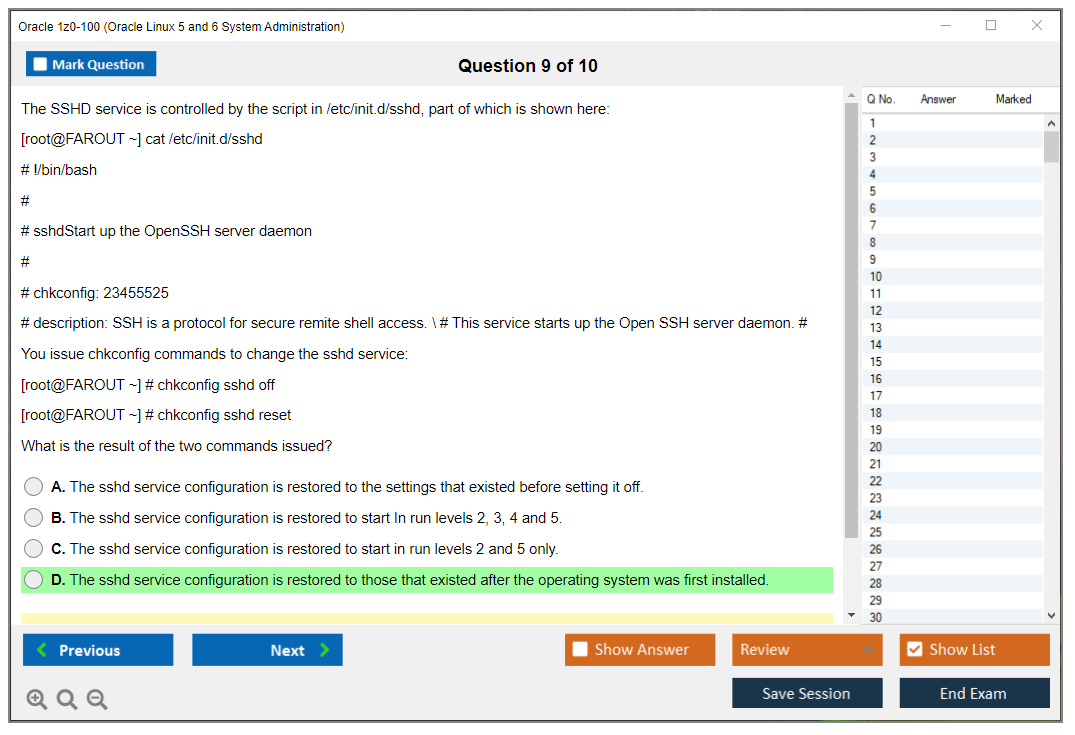
Boot troubleshooting? Sneaky hard. A prompt will mention a service not starting, a runlevel issue, or a misconfigured init script, and you need to think through chkconfig commands, service management, runlevel concepts, and where logs actually live. Short questions requiring multi-step thinking.
Oracle-only stuff you can't ignore
Here's where generic Linux training often abandons you. Oracle expects you to know their ecosystem basics at a functional level:
Ksplice patching Oracle Linux concepts, at minimum the "what is it and why would you use it" level of understanding. UEK versus the Red Hat compatible kernel, what's different, when you'd choose one. Oracle public YUM repositories and what that changes for package sources and update management. Oracle support tools that aren't covered in a random Linux+ course curriculum.
You don't need to become a walking Oracle sales brochure, spouting marketing language. You do need to recognize the terms and pick the right admin move when Oracle Linux offers two paths and one represents the Oracle-preferred approach.
What the exam objectives feel like in practice
The published 1z0-100 exam objectives read like a straightforward checklist, but the test enjoys mixing them together in unexpected ways. Installation and boot topics blend into service management questions. Users and groups morph into permissions scenarios. Logging turns into troubleshooting exercises where you need to find the right log file first.
Expect coverage like:
Users, groups, permissions, ACLs, and Linux user and group management Oracle Linux details that extend beyond "useradd exists as a command." Think umask behavior, special permission bits, and scenarios where ACLs become the correct answer instead of traditional permissions.
Package work with rpm and yum commands, plus repo configuration and dependency resolution logic.
Networking basics plus version-specific tooling differences that'll confuse you if you're not prepared.
Storage: partitions, filesystems, swap configuration, and LVM creation plus extension procedures.
Processes, cron/at scheduling, and log reading under pressure.
Security basics: firewall concepts and SELinux where applicable to OL6 environments.
Oracle Linux features: UEK kernel, Ksplice technology, repo sources that differ from standard RHEL.
Some of these you can "study" from documentation. Many of these you absolutely must do hands-on, repeatedly, until they feel natural.
Prereqs and lab setup that actually works
The 1z0-100 prerequisites aren't strict on paper. Oracle doesn't gate you from registering. Practically though, you want solid Linux filesystem hierarchy knowledge, command-line comfort that goes beyond basic navigation, shell basics including redirection and pipes, and system architecture concepts. If you don't instinctively know where config files live or how permissions really function at the bit level, you'll bleed points everywhere.
For labs, set up two VMs. One Oracle Linux 5 and one Oracle Linux 6. Even if it feels tedious and annoying. Dual-version complexity is real and your brain needs the contrast between how things work differently. Give them a second disk for LVM practice scenarios. Break networking on purpose, then fix it. Practice reading man pages quickly, scanning for the right flags. Fragments of practice. Repetition helps everything stick.
Study materials and practice tests that don't waste your time
Your best 1z0-100 study materials are boring, and that's exactly the point. They work. Oracle Linux documentation, release notes highlighting 5 versus 6 differences, man pages for every command in the objectives, and an exam guide if you like structured approaches. Oracle Linux 5 6 admin training courses can help, but only if you immediately lab every single topic after watching or reading about it.
For practice questions, I like using them diagnostically, not as a crutch you lean on instead of real understanding. An Oracle Linux system administration practice test should include detailed explanations and point you back to the right commands, config files, and troubleshooting approaches. If it's just "A/B/C/D" answers with no reasoning or context, it's basically trivia that won't translate to real competence.
If you want a quick drill set to identify weak spots after you've already done substantial lab work, the 1z0-100 Practice Exam Questions Pack costs $36.99 and works fine as a checkpoint tool, especially for validating you've fixed previous gaps. Use it, then go break your VM again practicing the areas you missed. Later in the week, hit the 1z0-100 Practice Exam Questions Pack again and see if your score improved for the right reasons. Deeper understanding, not memorization.
Two timelines that feel realistic based on experience levels: a 2-6 week track if you already admin Linux systems daily and just need Oracle-specific knowledge. An 8-12 week track if you're newer to Linux and need to build command speed plus troubleshooting habits from scratch. Either way, schedule lab time like it's a mandatory work meeting, because otherwise it really won't happen. Life fills the gaps.
Time pressure and command precision
120 minutes is usually adequate time. Still, the exam demands exact flags, exact file locations, and correct syntax without typos. That means you practice until the commands stop feeling like mystical spells you're desperately reciting and start feeling like familiar tools you reach for automatically. Know how to confirm details with man pages while studying, because that's how you build actual recall instead of fragile memorization.
Troubleshooting questions represent the "hard" part for most candidates. They often require a methodical approach: check logs first, verify config file syntax, confirm service status, validate network connectivity, confirm storage is mounted, and only then pick the fix that addresses the root cause. If you've never troubleshot issues under time pressure, practice that specific skill deliberately. It's different from leisurely problem-solving.
How it compares to RHCSA and Linux+
Compared to RHCSA? It's easier because there's no live performance lab component where you must configure a running system under a proctor's watchful timer with no reference materials. But it can require broader knowledge than CompTIA Linux+, because the Oracle-specific pieces and the OL5 versus OL6 split add mental overhead and domain coverage that Linux+ doesn't include.
I'd call it comparable to other Oracle associate-level exams in terms of difficulty curve. Broad coverage across many topics, intermediate depth on each, lots of practical admin reality rather than pure theory.
Who passes first attempt, who struggles, and what to do after a fail
Who typically passes first attempt? Candidates with 12+ months of daily Linux administration experience. People who complete thorough hands-on labs for all objectives rather than just reading about them. Professionals with RHEL/CentOS background who just need to learn Oracle's specific twists and tools.
Who struggles? Windows-first admins transitioning to Linux without adequate preparation, candidates relying solely on video courses without complementary lab practice, anyone uncomfortable living in the command line environment for extended periods. Slow typing speed. Slow reading comprehension. Slow diagnosis under pressure.
If you fail, and some people will, that's reality, don't just immediately rebook and hope for better luck. Use the score report to identify your two weakest domains and hammer them with focused labs until they become strengths. Then do targeted practice questions in those areas. The 1z0-100 Practice Exam Questions Pack can help you confirm you've actually fixed the gaps, but the real fix always involves more time in the terminal, not just more questions.
Renewal and keeping it current
Oracle certification renewal policies vary by program and when you earned the credential, and older exams don't always have the same renewal cadence you see in other vendor ecosystems like Cisco or Microsoft. Confirm what Oracle currently requires for your specific credential path rather than assuming.
If you're thinking long-term career development, consider newer Oracle Linux exams aligned to Oracle Linux 7/8/9, because that's what most production environments actually run now in 2024. Still, OL5/6 knowledge shows up in legacy estates, migration projects, and support situations where old systems linger. Technical skills age and become obsolete. Good troubleshooting habits stick forever.
FAQs people keep asking
It varies by region and testing provider, commonly falling in the typical Oracle exam price band. Confirm on Oracle's official exam page before paying, because taxes and currency conversion shifts change the final total you'll actually pay.
Oracle reports it in the official listing for the current exam version you're taking. Don't trust old forum posts from years ago, because thresholds and scoring presentation can change between exam versions and updates.
Intermediate for hands-on admins with experience. Challenging for theory-only learners without practical skills. Breadth of coverage, Oracle-specific tooling, and OL5 versus OL6 differences represent the big difficulty drivers that trip candidates up.
Boot processes and services, users and permissions including ACLs, RPM/YUM package management, networking configuration, storage including LVM administration, process management/logging/scheduling, basic security concepts, and Oracle Linux features like UEK kernel and Ksplice concepts.
Oracle Linux documentation plus man pages plus extensive hands-on labs form the foundation. Add a practice test with detailed explanations to identify weak areas, and treat question packs as validation tools, not the main study method replacing actual experience.
Oracle 1z0-100 Exam Objectives (Skills Measured)
The blueprint is your best friend
Okay, listen. Before booking Oracle 1z0-100, grab the official exam topics from Oracle University's site. This thing changes sometimes. Oracle won't always announce it loudly, they'll just update objectives, shift focus areas, no huge fanfare. You need the current version, not some sketchy PDF from Reddit circa 2015.
The blueprint breaks down everything. Major domains get listed with percentage weights, and here's what trips people up: they spend equal time on every section, which is honestly backwards. System installation's 8% while package management hits 20%? Guess where your lab time should go. Proportional study saves hours you'd otherwise waste on topics barely appearing on the actual exam.
Installation isn't just clicking "next"
Oracle Linux installation methods go way beyond burning an ISO and clicking through some GUI. Yeah, ISO media works, that's where most people start. I mean it's the obvious path. But the exam wants network installation using PXE boot, where a server on your network provides boot images and installation files over the network. Super common in enterprise environments deploying dozens or hundreds of systems simultaneously.
Kickstart automated installations? Huge. Kickstart files let you script everything: partitioning, package selection, network config, the whole deal. Create one kickstart file, point installations at it, boom, consistent deployments every time. Installation planning means understanding prerequisites, hardware compatibility, choosing the right installation source for your environment.
Partitioning decisions matter from day one
During installation, disk partitioning decisions affect the system's entire lifespan. Manual partitioning schemes require understanding what goes where. Do you need separate /home, /var, /tmp partitions, and how big should /boot be?
LVM setup during install absolutely needs hands-on time. Logical Volume Manager isn't just "advanced partitioning," it's flexibility for the future. Resize volumes, add disks to volume groups, create snapshots. The exam tests whether you understand when to use LVM versus traditional partitions, which depends on your use case.
Swap space allocation follows rules of thumb, often 1-2x your RAM, though it depends on workload and whether you plan hibernation. Filesystem type selection matters too: Ext3? Ext4? XFS? Each has different features, performance characteristics, use cases. Oracle Linux 6 defaults to ext4 for most stuff, but you need to know when to pick something else.
Boot loaders evolved between OL5 and OL6
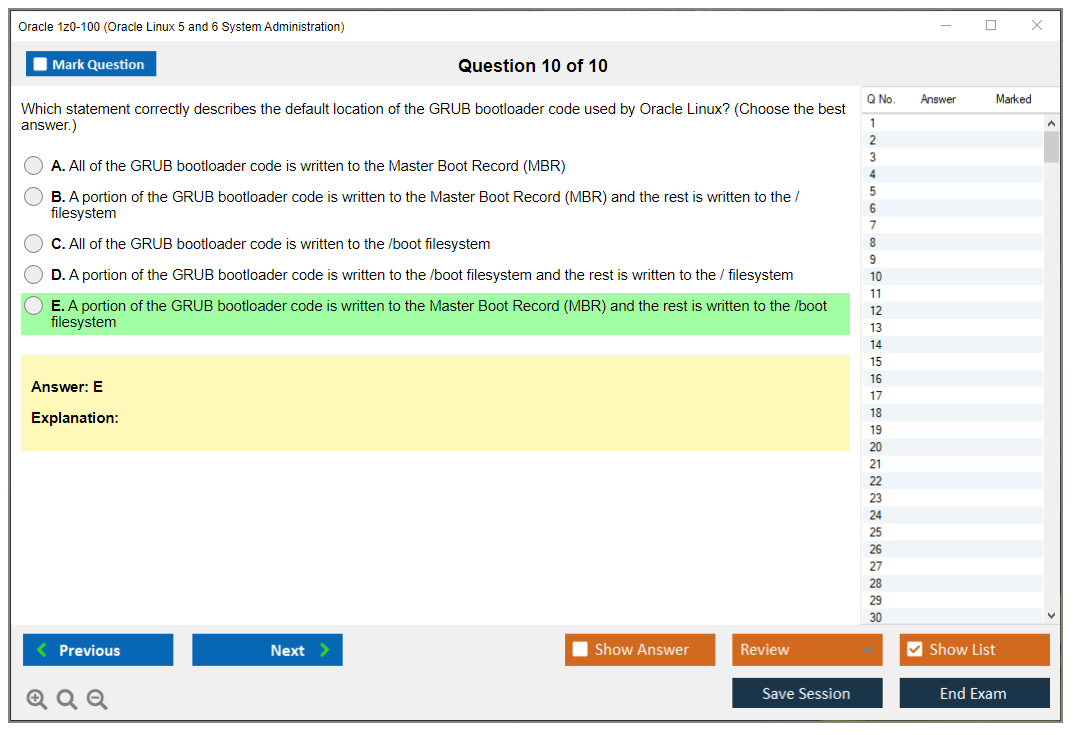
GRUB Legacy on Oracle Linux 5 is completely different from GRUB 2 concepts. The thing is, Legacy GRUB uses /boot/grub/grub.conf (symlinked from menu.lst) while GRUB 2 uses /boot/grub2/grub.cfg, which you don't edit directly. You modify /etc/default/grub and regenerate the config instead.
Boot menu editing during system startup is critical for troubleshooting. You hit 'e' in GRUB to edit entries, modify kernel parameters on the fly, then boot with those temporary changes.
Kernel parameter modification lets you boot to single-user mode (append 'single' or '1'), disable SELinux temporarily (selinux=0), or adjust hardware settings. Boot troubleshooting scenarios pop up constantly in real admin work and definitely on this exam.
The boot sequence is a chain reaction
Boot process sequence starts with BIOS/POST, hardware initialization before any OS code runs. Then the boot loader (GRUB) loads and starts the kernel. Kernel initialization brings up core system functions, mounts the root filesystem, starts the first user-space process. On Oracle Linux 5, that's the init process reading /etc/inittab. Oracle Linux 6 has Upstart handling initialization differently.
Runlevel execution follows. The system enters a specific runlevel (usually 3 for multi-user text mode or 5 for graphical). Service startup order's controlled by init scripts with priority numbers. Understanding this chain helps troubleshoot when systems hang during boot or services fail starting.
Runlevels are old school but testable
Runlevel management covers traditional Unix system states. Runlevel 0 is halt. 1 is single-user mode. 2 is multi-user without NFS. 3 is full multi-user text. 5 is graphical. 6 is reboot.
Changing runlevels with init or telinit is straightforward. init 3 drops you to text mode, init 6 reboots.
Default runlevel configuration differs between versions. Oracle Linux 5 uses /etc/inittab with a line like id:3:initdefault: to set default. Oracle Linux 6 moved this to /etc/init/rc-sysinit.conf or uses /etc/inittab compatibility. Not gonna lie, the differences between OL5 and OL6 here are annoying to memorize, but the exam absolutely tests both. I once spent an entire weekend just drilling these version differences because I kept mixing them up during practice tests.
Managing services the old way
System service management revolves around the service command and chkconfig. service httpd start starts Apache right now. chkconfig httpd on makes Apache start automatically at boot. Understanding init scripts in /etc/init.d/ helps when troubleshooting service startup issues or creating custom services.
Each init script follows standard structure: start, stop, restart, status functions. Scripts receive arguments like start or stop and execute appropriate code. Priority numbers in /etc/rc.d/rc3.d/ (or similar) control startup order. S10network starts before S85httpd because 10 comes before 85.
Upstart changed things in OL6
Upstart basics on Oracle Linux 6 introduce event-based initialization. Instead of just runlevels, Upstart uses jobs responding to events. Configuration files live in /etc/init/ with .conf extensions. The initctl command lets you interact with Upstart. initctl list shows jobs and their states, initctl start jobname starts a job manually.
Differences from SysV init include better parallelization (services can start simultaneously if they don't depend on each other), respawning crashed services automatically, more flexible dependency handling. The exam wants you comfortable with both systems since you're covering OL5 and OL6.
Recovery skills save careers
System initialization troubleshooting starts with single-user mode access. Boot with 'single' or '1' as a kernel parameter and you get a root shell with minimal services running, perfect for fixing broken configs or resetting passwords. Boot parameter modification for recovery includes appending init=/bin/bash to get a shell even earlier in the boot process, or using rd.break on some systems to interrupt the boot sequence.
Resolving boot failures might mean fixing /etc/fstab errors preventing filesystem mounting, repairing GRUB installations after disk changes, or dealing with SELinux contexts preventing critical services from starting. These scenarios are where you prove you're more than just a button-clicker.
User accounts are table stakes
User account creation and management with useradd, usermod, userdel commands need to be second nature. useradd -m -s /bin/bash -c "John Doe" jdoe creates a user with home directory, bash shell, comment field. Options like -u for UID, -g for primary group, -G for supplementary groups all matter.
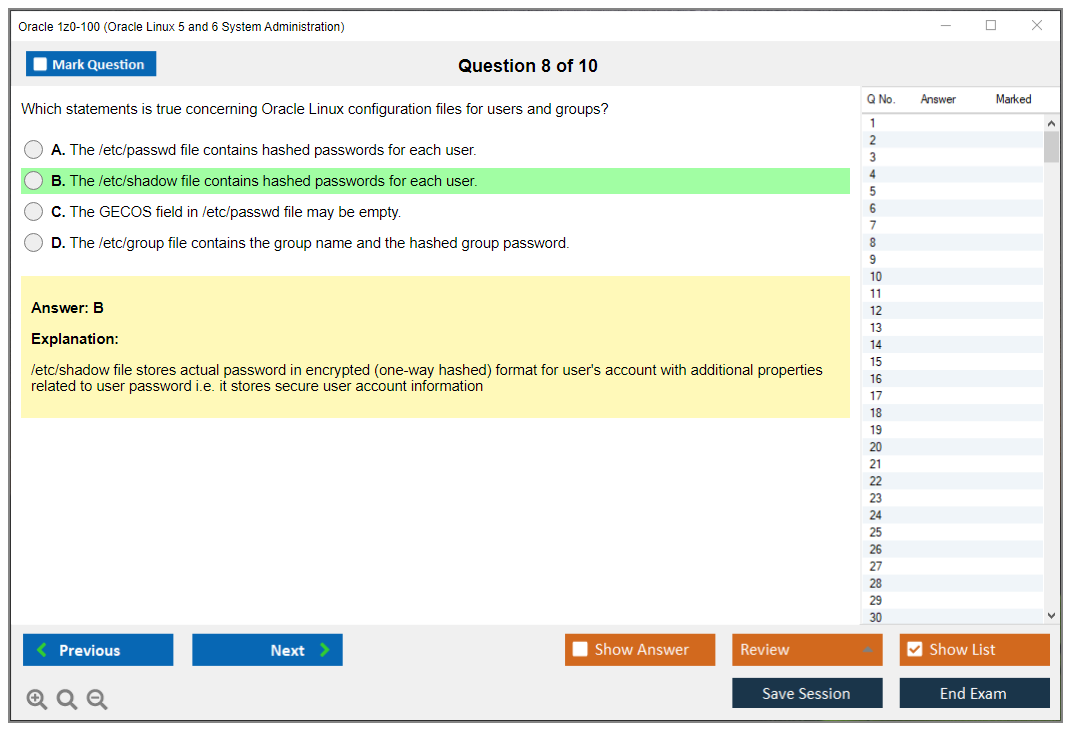
Understanding /etc/passwd structure is key. Each line has seven colon-separated fields: username, password placeholder (x), UID, GID, comment, home directory, shell. /etc/shadow holds actual password hashes plus aging information. This is where real security lives.
Groups organize permissions
Group administration uses groupadd, groupmod, groupdel. Primary groups (one per user, defined in /etc/passwd) versus secondary groups (multiple allowed, listed in /etc/group) confuses people. A user's primary group owns files they create by default, but they can access resources permitted to any secondary groups.
/etc/group lists groups with members. /etc/gshadow adds group passwords and administrators, rarely used in modern systems but still testable. Adding users to groups with usermod -aG groupname username is safer than editing files directly because it validates syntax and handles locking.
Password policies enforce discipline
Password policies and aging control account security. The passwd command sets or changes passwords. passwd username as root resets someone's password. chage manages password aging. chage -l username lists aging info, chage -M 90 username sets maximum password age to 90 days.
/etc/login.defs provides system-wide defaults for password aging, UID ranges, home directory creation.
Account expiration management is separate from password expiration. usermod -e 2024-12-31 username makes an account expire on that date. chage -E does the same thing. Expired accounts can't log in even with valid passwords.
Permissions are the foundation of security
File permissions fundamentals, read, write, execute for user/group/other, are absolutely core. Read (r/4) lets you view file contents or list directory contents. Write (w/2) lets you modify files or create/delete files in directories. Execute (x/1) lets you run files as programs or cd into directories.
chmod with symbolic notation looks like chmod u+x file (add execute for user) or chmod go-w file (remove write for group and other). Octal notation's faster once you memorize it. chmod 755 file sets rwxr-xr-x. Permission inheritance isn't automatic on Linux. New files get permissions based on umask, not parent directory permissions.
Special permissions add capabilities
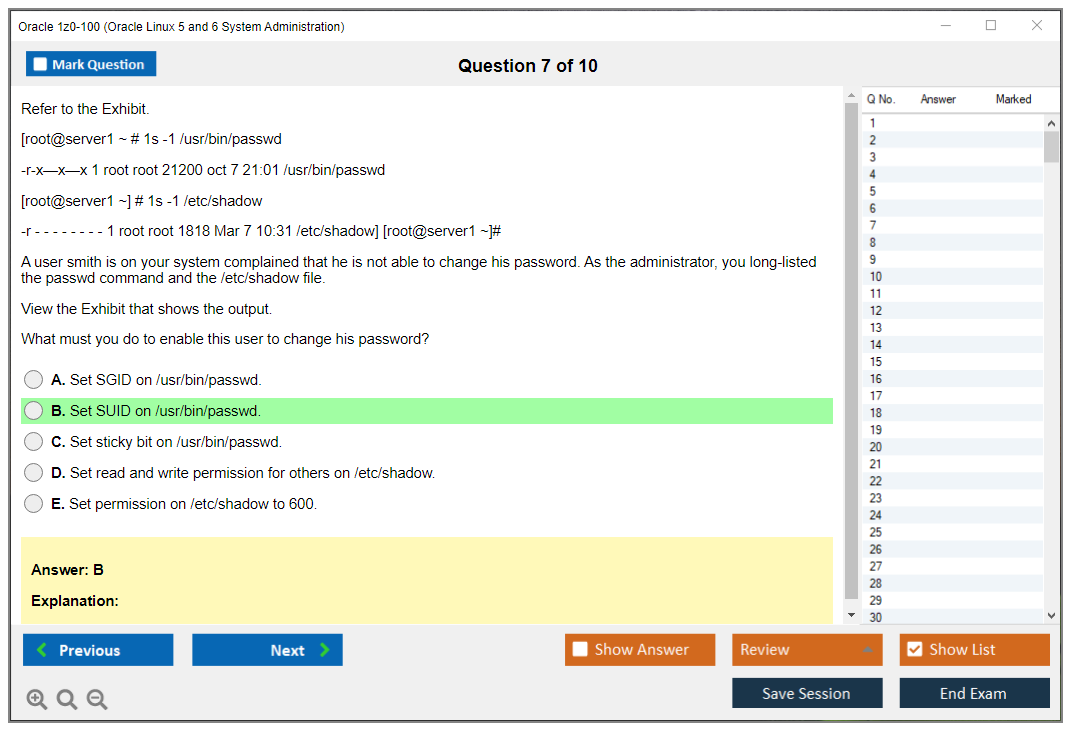
SUID, SGID, sticky bit are special permissions beyond basic rwx. SUID (set user ID) on executables makes them run with owner's privileges. /usr/bin/passwd needs SUID to let regular users modify /etc/shadow. That's 4000 in octal or chmod u+s.
SGID on files runs them with group privileges. SGID on directories makes new files inherit the directory's group, super useful for shared project directories. That's 2000 in octal or chmod g+s.
Sticky bit on directories (like /tmp) means only file owners can delete their own files, even if everyone has write permission. 1000 in octal or chmod +t. Security implications are huge. Misconfigured SUID binaries are classic privilege escalation vectors.
ACLs break the three-user limitation
Access Control Lists extend permissions beyond traditional user/group/other model. getfacl shows ACLs on a file. setfacl sets them. setfacl -m u:bob:rw file gives user bob read-write access to a file, even if he's not the owner and not in the group. This solves the problem where you need granting specific access to multiple users without creating groups for every combination.
Extended permissions let you build complex permission structures. You can grant different users different access levels to the same file. Mask entries control maximum effective permissions. Default ACLs on directories automatically apply to new files created there.
Ownership controls who can do what
File ownership with chown and chgrp commands changes who owns files and what group they belong to. chown user:group file changes both at once. chown -R user:group directory/ recursively changes everything inside.
Ownership implications for access control mean owning a file gives you full permission control over it. You can always chmod your own files, regardless of current permissions.
User environments customize the experience
User environment configuration starts with /etc/skel/ templates. When useradd creates a home directory, it copies everything from /etc/skel as starting point.bash_profile runs once at login for login shells.bashrc runs for every interactive shell, including new terminal windows. User-specific environment variables like PATH, EDITOR, custom aliases go in these files.
Understanding the difference between login and non-login shells matters for troubleshooting environment problems. SSH sessions usually invoke login shells. Opening a new terminal tab usually invokes non-login shells.
PAM controls authentication
PAM (Pluggable Authentication Modules) basics are testable at conceptual level. Configuration files live in /etc/pam.d/, one file per service. The authentication stack concept means multiple modules process authentication in order. If one fails, authentication might still succeed depending on control flags (required, requisite, sufficient, optional).
Common PAM modules include pam_unix.so for traditional password authentication, pam_deny.so to block access, pam_limits.so for resource limits, pam_cracklib.so for password strength checking. You don't need writing PAM configs from scratch for this exam, but you should understand how they work and where to look when troubleshooting authentication issues.
sudo grants temporary power
sudo configuration through /etc/sudoers lets you grant administrative privileges without sharing root password. visudo is the only safe way to edit sudoers, it validates syntax before saving, preventing lockouts from typos. Granting privileges looks like username ALL=(ALL) ALL for full root access or username ALL=/usr/bin/systemctl restart httpd for specific commands only.
sudo logging to /var/log/secure (or /var/log/auth.log on some systems) creates audit trail of who ran what commands with elevated privileges. This is basic accountability for security and compliance.
RPM is the packaging foundation
RPM package management fundamentals start with understanding package naming conventions. A package name like httpd-2.4.6-90.el7.x86_64.rpm breaks down to: name (httpd), version (2.4.6), release (90.el7), architecture (x86_64), extension (.rpm).
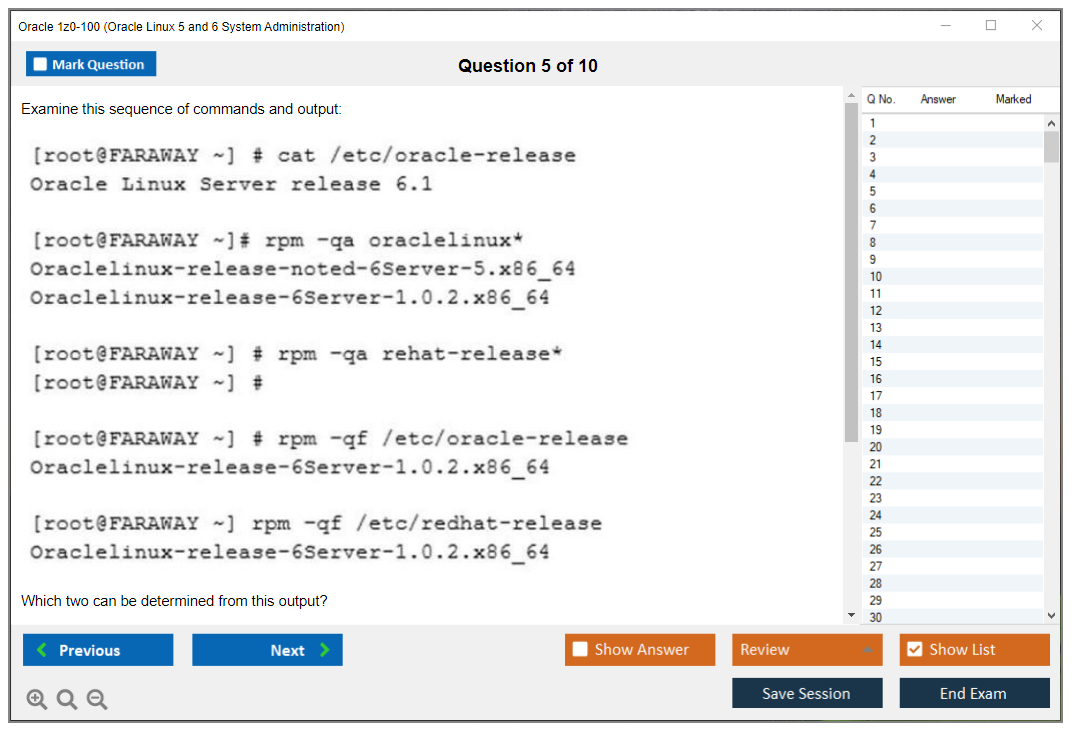
Querying installed packages with rpm uses -q options. rpm -qa lists all packages, rpm -qi packagename shows detailed info.
RPM installation and removal require understanding dependencies. rpm -ivh package.rpm installs with verbose output and hash marks showing progress. rpm -e packagename removes (erases) a package. rpm -Uvh package.rpm upgrades, which is actually install-then-remove-old-version. Handling package dependencies manually with RPM is painful. You've gotta install prerequisite packages first, in right order.
RPM verification catches changes
RPM verification and integrity checking help you spot problems. rpm -V packagename verifies a package by comparing installed files against package database. Output shows what changed: S for size, M for mode/permissions, 5 for MD5 checksum. rpm --checksig package.rpm verifies package signatures before installation, confirming the package came from trusted source and wasn't tampered with.
Identifying modified files is critical for security audits and troubleshooting. If a config file shows up as modified, maybe that's expected. If a binary shows checksum changes? That's potentially malicious.
RPM queries answer questions
RPM query capabilities are extensive. rpm -qf /usr/bin/ls tells you what package owns that file. rpm -ql coreutils lists all files in coreutils package. rpm -qd httpd lists documentation files for Apache. rpm -qR httpd shows what httpd requires (dependencies). These queries help you understand what's installed and how packages relate to each other.
YUM makes life easier
YUM architecture and advantages center on automatic dependency resolution. YUM figures out what else you need and installs it automatically. Repository-based management means packages come from configured repos, not individual files you download manually. Updates are easier too. yum update refreshes everything from repos.
YUM repository configuration files live in /etc/yum.repos.d/ with .repo extensions. Each file defines one or more repositories with [reponame], name=, baseurl=, enabled=, gpgcheck= directives. Enabling/disabling repositories with yum-config-manager or editing files directly controls what packages are available. Repository priorities (via priorities plugin) let you prefer certain repos over others when same package exists in multiple places.
Oracle's public YUM server is gold
Configuring access to Oracle's public YUM repositories gives you official packages directly from Oracle. The repository channels differ by Oracle Linux version. You need OL5 repos for Oracle Linux 5, OL6 repos for Oracle Linux 6. Oracle provides base OS packages, updates, Unbreakable Enterprise Kernel (UEK) packages, add-ons through different channels.
YUM operations are straightforward
YUM package operations are simpler than RPM. yum install httpd installs Apache and all dependencies. yum remove httpd uninstalls it. yum update updates all packages with available updates. yum upgrade is similar but also handles obsolete packages, it's more aggressive about removing packages replaced by newer ones.
YUM search and information commands help you find what you need. yum search keyword searches package names and descriptions. yum info packagename shows detailed package information like size, repo source, description. yum list available shows installable packages, yum list installed shows what's already on your system.
YUM groups bundle packages
YUM group management handles package collections. yum grouplist shows available groups like "Development Tools" or "Web Server". yum groupinstall "Development Tools" installs everything in that group with one command. Group definitions come from repo metadata and group files. This makes it easy setting up systems for specific roles without knowing every
Conclusion
Wrapping up your 1z0-100 prep path
Real talk? The Oracle 1z0-100 exam isn't some impossible mountain to climb, but it definitely expects you to know your way around Oracle Linux 5 and 6 at a level that goes way beyond just "I can run a few commands." You need genuine hands-on experience with LVM and storage administration Oracle Linux environments, solid understanding of RPM and YUM package management Oracle Linux systems use, and honestly the ability to troubleshoot when things go sideways at 2am. Which they absolutely will in any real admin role. I once spent a full night tracking down a storage issue that turned out to be a misconfigured multipath setting. Not fun, but that's the job.
The exam objectives cover everything. I mean, from boot processes and user and group management Oracle Linux admins deal with daily, to the Oracle-specific stuff like Ksplice patching Oracle Linux brings to the table. That's actually what trips people up sometimes. They know generic Linux but haven't spent enough time with Oracle's tooling and ecosystem quirks.
The 1z0-100 exam cost varies depending on your region and testing provider, typically somewhere in the $245-$300 range. Not pocket change. You don't wanna waste that by showing up unprepared, trust me. The 1z0-100 passing score sits around 60-70% in most cases (Oracle doesn't always publish exact numbers publicly), but here's the thing. You're not aiming to barely pass. You're building skills that actually matter when you're managing production Oracle Linux systems down the road.
Your study approach? Matters more than most people think. Sure, grab the official Oracle Linux 5 6 admin training materials and documentation, set up your lab environment with VMs running both versions, break things and fix them repeatedly until it clicks. But with checking you're actually ready, you need to test yourself under realistic conditions with scenarios that mirror what the exam actually throws at you. No shortcuts there.
That's where quality Oracle Linux system administration practice test resources become necessary. Honestly, I've seen too many people memorize commands but freeze completely when faced with multi-step troubleshooting scenarios or configuration tasks that require understanding, not just recall. Before you schedule your exam attempt, seriously consider working through thorough 1z0-100 study materials that include detailed explanations, not just answer keys that leave you guessing.
If you're looking for solid prep that covers the full scope of the Oracle Linux 5 and 6 System Administration certification, check out this 1z0-100 Practice Exam Questions Pack. It'll help you identify gaps before exam day instead of discovering them in the testing center when it's way too late to do anything about it.
Show less info
Hot Exams
Related Exams
Oracle Fusion Middleware 11g: Build Applications with Oracle Forms
Oracle Business Process Management Suite 12c Essentials
Oracle WebLogic Server 12c Essentials
Oracle Utilities Customer Cloud Service 2022 Implementation Professional
Oracle Cloud Platform Application Development 2020 Specialist
Oracle Linux 6 Advanced System Administration
Oracle WebLogic Server 12c: Advanced Administrator II
Oracle EBS R12.1 General Ledger Essentials
Oracle Database 12c SQL
Oracle Database 12c Essentials
Oracle Database Administration I
Oracle Business Intelligence Foundation Suite 11g Essentials
Oracle EBS R12.1 Payables Essentials
MySQL 5.7 Database Administrator
Oracle Database 19c: Program with PL/SQL
Upgrade to Oracle Solaris 11 System Administrator
How to Open Test Engine .dumpsarena Files
Use FREE DumpsArena Test Engine player to open .dumpsarena files


DumpsArena.co has a remarkable success record. We're confident of our products and provide a no hassle refund policy.

Your purchase with DumpsArena.co is safe and fast.
The DumpsArena.co website is protected by 256-bit SSL from Cloudflare, the leader in online security.